
AI for podcasters has moved from novelty to infrastructure. In 2026, the typical production pipeline for an independent show looks very different from the waveform-and-razor-blade editing of a few years ago: you record, an AI transcribes the episode, edits out filler, drafts chapters and show notes, and cuts clips for social. This guide walks through the complete AI for podcasters workflow — six stages from record to publish.
This guide walks through the complete AI-assisted podcast workflow, from recording to distribution, based on published feature documentation and pricing from the leading platforms. It covers Descript, Riverside, Podcastle, Adobe Podcast, and supporting tools like Auphonic and Cleanvoice; explains exactly what each stage of the pipeline looks like; and gives you realistic time savings and cost figures so you can decide what to adopt and what to skip. No hype about replacing producers — just the practical division of labor between you and the machine.
The Modern AI Podcast Pipeline at a Glance
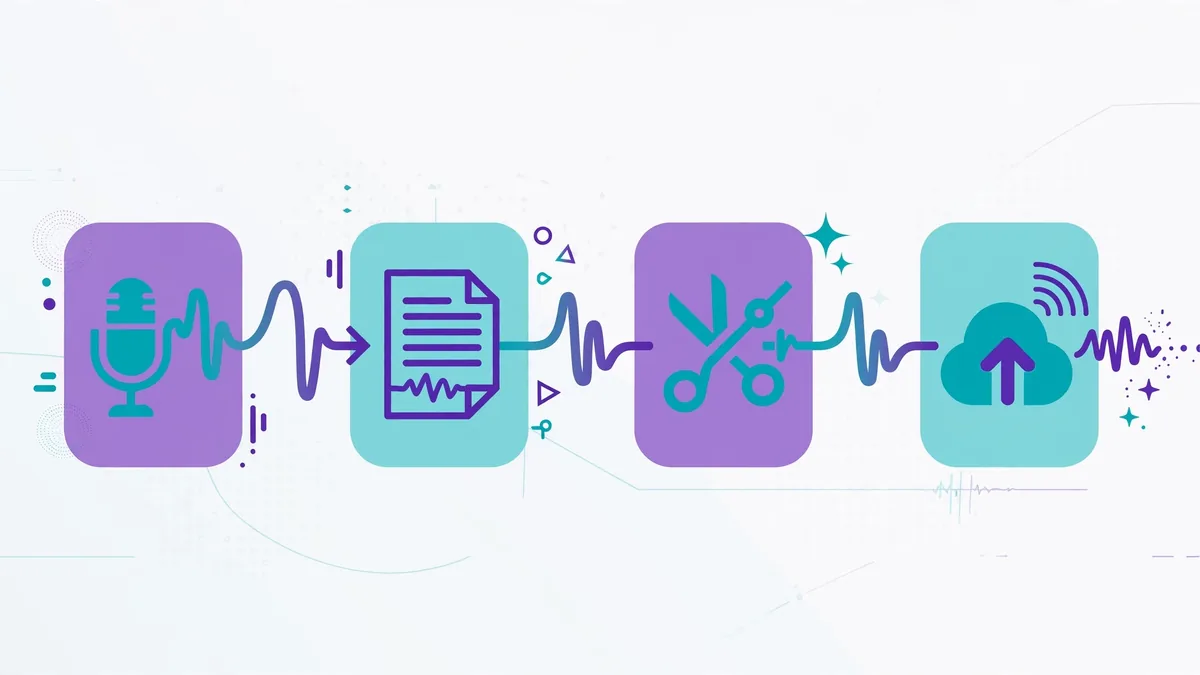
A full episode now passes through six stages, and AI touches every one of them:
- Recording — remote guests recorded locally on separate tracks, with AI handling noise suppression and backup
- Transcription — automatic speech-to-text with speaker labels, the foundation everything else builds on
- Editing — text-based editing, filler-word and silence removal, AI audio enhancement
- Chapters and structure — automatic chapter markers with titles, key-moment detection
- Show notes and metadata — SEO-friendly descriptions, guest bios, timestamps, transcripts for accessibility
- Repurposing — short clips for TikTok/Reels/Shorts, audiograms, quote graphics, newsletter drafts
Understanding the pipeline matters because tools specialize at different stages. Riverside dominates stage one; Descript dominates stages three through six; Auphonic is a stage-three specialist. Buying one tool and expecting it to do everything is the most common disappointment in podcast AI.
Stage 1: Recording — AI Starts Before You Hit Stop
Remote recording quality used to depend on your guest’s internet connection. Modern platforms solve this by recording each participant locally on their own device and uploading the high-quality files afterward — so a frozen video call still yields studio-grade audio. Riverside is the benchmark here: separate audio and video tracks, up to 4K video, 48 kHz audio, and a teleprompter for hosts. Its 2026 plans include AI editing, Magic Clips for repurposing, and show-note generation, with the Pro tier priced around $24 per month on annual billing.
Podcastle offers a similar all-in-one proposition — recording, editing, and even hosting — with a friendlier interface and a lower entry price around $11.99 per month. Its free plan is notably generous, which makes it the easiest way for a new podcaster to try the full AI workflow without paying. Descript also records, but remote recording is not its strength; many producers record in Riverside and import into Descript for editing.
AI’s role at this stage is quiet but important: background noise suppression during recording, automatic backup tracks, and echo handling. None of this replaces a decent microphone and a quiet room — AI cleanup works best on good source audio and merely rescues mediocre audio. Buy the $70 USB microphone before you buy the $24-per-month AI plan.
Stage 2: Transcription — The Foundation Everything Builds On
Transcription quality is the foundation: every downstream step in the AI for podcasters pipeline depends on an accurate transcript. Test with your actual microphone in your actual room — demos use studio audio. The AI for podcasters tools that handle crosstalk and accents well are worth paying for.
Transcription accuracy is the load-bearing wall of the entire AI podcast workflow. Text-based editing, chapter generation, show notes, and clip-finding all depend on a transcript that correctly attributes words to speakers. In 2026, the major platforms all deliver strong English transcription with speaker diarization (labeling who said what), and accuracy on clear audio is high enough that most producers edit from the transcript rather than the waveform.
Descript pioneered this model: it transcribes automatically, and you edit audio and video by editing the text. Delete a sentence in the transcript and the corresponding audio is removed. The experience feels like editing a Google Doc, and for dialogue-heavy interview shows it is dramatically faster than waveform editing. Descript’s free tier includes about an hour of transcription per month; the Creator plan at around $24 per month raises that to roughly 10 hours plus AI features.
Riverside and Podcastle both include transcription with text-based editing, though Descript’s implementation remains the most refined according to comparative reviews. Riverside’s Pro plan includes unlimited transcriptions. For accessibility and SEO, export transcripts as WebVTT, SRT, or plain text — searchable episode transcripts are one of the highest-ROI outputs in podcasting because they make your content discoverable by search engines.
One honest limitation: transcription still stumbles on heavy accents, crosstalk (two people talking over each other), and domain-specific jargon. Budget a skim-through pass for correction, especially for technical shows. AI gets you 90–95% of the way; the last few percent is human.
Stage 3: Editing — Filler Words, Silence, and Studio Sound
Editing judgment call: auto-remove filler words aggressively for solo shows, conservatively for interviews — over-editing guests sounds robotic. The best AI for podcasters editing tools let you set removal sensitivity per track. Review the first three AI for podcasters edited episodes fully; after that, spot-check.
This is where AI saves the most time. The three big wins:
Filler-word removal. Every “um,” “uh,” “you know,” and “like” gets detected across the transcript, and you can delete all instances at once — some tools let you replace them with short natural pauses instead of hard cuts, which sounds far more human. Descript’s one-click filler removal is the category reference; Riverside and Podcastle include equivalent features.
Silence trimming. Long pauses, dead air at the top of the recording, and the gaps where someone muted themselves all get flagged and removable in bulk. Be careful with interview shows — removing every pause can make conversation sound rushed and unnatural. Many producers trim silences above a threshold (say, 0.8 seconds) rather than all of them.
Audio enhancement. Descript’s Studio Sound, Adobe Podcast’s Enhance Speech, and Podcastle’s Magic Dust apply AI noise reduction, leveling, and room-tone cleanup. Adobe Podcast’s Enhance is available on a free tier and is genuinely impressive on noisy recordings. Auphonic takes a different approach: it is a dedicated post-production service that handles loudness normalization (to podcast standards), noise and hum reduction, and leveling across speakers — starting around $11 per month for 9 hours of processing, with 2 free hours monthly. Cleanvoice specializes in filler and noise removal at roughly $10 per 10 hours.
A realistic time picture: producers report that AI-assisted editing cuts the editing phase from several hours to under an hour for a typical 45-minute interview episode — but only after a short learning curve with text-based editing. Your first two episodes will feel slower as you learn the workflow; episode five onward is where the savings compound.
Stage 4: Chapters, Timestamps, and Structure
Chapter markers have become table stakes for listener experience — YouTube, Spotify, and Apple Podcasts all support them, and listeners use them to skip to the segments they care about. Manually noting timestamps while editing used to be tedious; AI now generates chapter titles and timestamps from the transcript automatically.
Descript and Riverside both generate clickable chapter markers with descriptive titles (e.g., “04:15 — The State of AI in 2026”) that paste directly into YouTube descriptions and Spotify episode metadata. Some tools also detect “key moments” — quotable segments or topic transitions — which double as candidates for social clips in stage six.
Best practice: review AI-generated chapters before publishing. The AI sometimes splits topics too granularly or writes titles that are accurate but dull. A two-minute human pass — merging redundant chapters and sharpening titles with curiosity-gap phrasing — noticeably improves click-through on YouTube.
Stage 5: Show Notes, Descriptions, and SEO
Show notes that rank: feed the transcript plus your target keywords into the AI for podcasters writing step, then human-edit the result. AI for podcasters show notes work best as structured summaries with timestamps — both listeners and search engines prefer them over verbatim transcripts.
Show notes are where podcasting meets search engine optimization, and AI handles the heavy lifting. From the transcript, modern tools generate:
- Episode descriptions with key takeaways, suitable for Spotify and Apple Podcasts
- Guest bios assembled from the conversation context
- Timestamped chapter lists in markdown format
- SEO-optimized summaries for your website’s episode page
- Full transcripts for accessibility compliance and search indexing
The workflow that works: generate the draft with AI, then spend ten minutes personalizing it. Add the specific links mentioned in the episode (AI often hallucinates URLs — always verify), write one original paragraph with your own take, and make sure the guest’s name, title, and links are correct. Search engines reward episode pages that combine AI-generated structure with human-added specifics; pure AI output tends to read generic and earns fewer backlinks.
A note on AI disclosure: podcast platforms do not currently require you to label AI-assisted editing the way some video platforms label synthetic media. Editing assistance (cleanup, transcription, notes) is universally considered normal production, not deceptive AI content. Voice cloning is the exception — see the ethics section below.
Stage 6: Repurposing — Clips, Audiograms, and Social Content
One episode should feed a week of content, and AI clip generation is how small teams manage it. Riverside’s Magic Clips automatically identifies highlight moments and formats them as vertical videos with captions — widely regarded as the best implementation. Descript generates clips with templates, animated captions, and audiogram-style waveforms. Podcastle offers basic clip creation.
The practical workflow: let the AI propose 8–12 candidate clips per episode, then a human picks the best 3–5. AI is good at finding energetic moments and complete thoughts; it is bad at judging which moment will actually stop a scroller. Add burned-in captions to every clip (most viewers watch muted), keep clips under 60 seconds, and always include a hook in the first two seconds.
Beyond video clips, the transcript can generate quote graphics, a newsletter edition summarizing the episode, and a blog post version for SEO. Teams that used to spend a full day repurposing one episode now finish in about an hour — the bottleneck shifts from production to distribution strategy.
Voice Cloning and AI Voices: Power With Boundaries
Descript’s Overdub and Podcastle’s Revoice can clone your voice from training audio (Descript asks for roughly 30 minutes of clean audio; Podcastle’s Revoice needs far less — around 70 sentences). Legitimate uses include fixing a misspoken word without re-recording, recording pickups when you’re sick, and generating ad reads in your own voice.
The ethical lines are clear and worth stating: never clone a guest’s voice without explicit written consent, never fabricate quotes, and disclose to listeners if a segment was AI-generated rather than recorded. Several jurisdictions now have laws against deceptive synthetic media. For most podcasters, voice cloning is a repair tool, not a production method — use it to fix, not to fake.
AI for Podcasters: Tool Comparison — Picking Your Stack
| Tool | Strongest Stage | Text Editing | Filler Removal | Voice Clone | Entry Price |
|—|—|—|—|—|—|
| Descript | Editing + repurposing | Best-in-class | Yes (1-click) | Yes (Overdub) | Free; ~$24/mo |
| Riverside | Recording | Yes | Yes | No | ~$24/mo (annual) |
| Podcastle | All-in-one simplicity | Yes (lighter) | Yes | Yes (Revoice) | Free; ~$11.99/mo |
| Adobe Podcast | Audio enhancement | Via transcript | No | No | Free tier; CC plans ~$22.99/mo |
| Auphonic | Post-production polish | No | No | No | Free 2 hrs/mo; ~$11/mo |
| Cleanvoice | Cleanup specialist | No | Yes | No | Trial; ~$10/10 hrs |
Recommended stacks by show type:
- Interview show, remote guests: Record in Riverside → edit in Descript → polish with Auphonic if needed. This is the most common professional stack.
- Solo show, beginner: Podcastle all-in-one — record, edit, enhance, and host in one place for ~$11.99 per month.
- Video podcast for YouTube: Riverside for 4K multitrack recording → Descript for text-based video editing and clip templates.
- Budget-constrained: Free tiers of Descript (1 hr/mo transcription) + Adobe Podcast Enhance + Auphonic’s free 2 hours cover a surprising amount of a monthly show.
Realistic Costs and Time Savings
Realistic budget: a serious independent show spends roughly $30–80/month on AI for podcasters tooling and saves 4–6 hours per episode. At that ratio, AI for podcasters software is the highest-ROI purchase most podcasters make — cheaper than one hour of freelance editing.
Add it up for a weekly 45-minute interview show publishing four episodes a month:
- Riverside Pro (~$24) + Descript Creator (~$24) = roughly $48 per month for the core stack
- Auphonic’s entry tier (~$11) if you want automated loudness mastering
- Total: $50–$60 per month for a professional AI pipeline
Against that, the time savings: transcription and rough-cut editing that took 4–6 hours per episode drops to 1–2 hours including review passes. Show notes and chapters go from 1–2 hours to 15 minutes. Clip generation goes from half a day to an hour. For a weekly show, that is roughly 15–20 hours saved per month — the subscription pays for itself if your time is worth more than about $3 per hour, which it is.
The costs to watch: transcription-hour caps on lower tiers (a 90-minute episode eats most of a 10-hour monthly allowance fast), per-minute overage charges, and the temptation to stack overlapping tools. Audit your subscriptions quarterly — Descript, Riverside, and Podcastle increasingly overlap, and most shows need two of the three, not all three.
Common Mistakes to Avoid
- Publishing AI show notes verbatim. They read generic, they sometimes invent links, and they miss the specific details that make your episode worth finding. Always add your own paragraph and verify every URL.
- Over-trimming silences. A conversation with zero pauses sounds anxious. Keep natural breathing room, especially in emotional or thoughtful moments.
- Skipping the transcript review. One wrongly transcribed name or technical term, repeated across show notes and chapters, looks sloppy. Skim the transcript for proper nouns.
- Clipping without strategy. Ten random clips posted without hooks or captions perform worse than three well-chosen ones. AI finds moments; you choose winners.
- Ignoring loudness standards. Podcasts should target around -16 LUFS for stereo (the widely used podcast standard). Auphonic handles this automatically; if you master manually, check loudness before publishing — inconsistent volume between episodes drives listeners away faster than any content issue.
Keep Exploring These Guides
If you found this ai for podcasters walkthrough useful, these related guides go deeper on adjacent workflows:
- AI for YouTubers: The Complete Script-to-Publish Workflow
- Best AI Transcription Tools Compared (2026)
Frequently Asked Questions
Will AI editing make my podcast sound robotic?
Only if you let it. The robotic sound comes from over-aggressive processing — removing every pause, every breath, every “um” — which strips out the natural rhythm of speech. Used with restraint (bulk-remove fillers, trim only long silences, keep conversational pacing), AI editing produces audio that sounds like a polished version of the real conversation, not a robot reading a script.
Do I need Descript AND Riverside, or is one enough?
They solve different problems. Riverside is a recording studio (best-in-class remote capture); Descript is an editing suite (best-in-class text-based editing). If your show is solo and recorded locally, Descript or Podcastle alone may suffice. If you interview remote guests, recording in Riverside and editing in Descript is the standard professional workflow — each tool doing what it does best.
How accurate is AI transcription for podcasts?
On clear, single-speaker audio with minimal crosstalk, current transcription engines are highly accurate — good enough that most producers edit from the transcript. Accuracy drops with heavy accents, overlapping speech, poor microphones, and specialized jargon. Always skim for proper nouns and technical terms before publishing transcripts or AI-generated show notes.
Can AI really generate good show notes?
AI generates good show-note drafts — structured, complete, and fast. It does not generate good final show notes without human input, because it misses the specific links, the memorable quote, and your personal take that make notes worth reading. Treat AI output as a 70%-done draft and budget ten minutes per episode for the human finishing pass.
Is it ethical to use AI voice cloning in my podcast?
Fixing your own misspoken words with your own cloned voice, with disclosure where appropriate, is widely considered acceptable production practice. Cloning someone else’s voice without consent, fabricating statements, or passing off fully synthetic segments as recorded conversation crosses ethical and in some places legal lines. When in doubt, disclose.
What is the cheapest way to start a podcast with AI tools?
Use free tiers strategically: Podcastle’s free plan for recording and basic editing, Adobe Podcast’s free Enhance for audio cleanup, and Auphonic’s free 2 hours per month for mastering. That stack costs nothing and covers a monthly or biweekly show. When you outgrow the free caps — usually at weekly publishing — the ~$12–$24 entry plans are the natural next step.
Will AI for podcasters make shows sound robotic?
Only if you let it. AI for podcasters tools remove filler and polish audio, but the conversational feel comes from your recording, not the processing. Keep some natural pauses and laughter — the best AI for podcasters workflows enhance personality rather than erasing it.
Conclusion
AI has not replaced the podcast producer; it has eliminated the producer’s most tedious hours. Transcription, filler removal, silence trimming, chapter generation, show notes, and clip cutting — the mechanical middle of every episode — are now substantially automated, well-documented, and affordable at $50–$60 per month for a professional stack. What remains human is exactly what listeners actually value: the questions you ask, the guests you choose, the taste you apply to clips, and the judgment calls no model can make. Map your current process against this AI for podcasters pipeline and automate the slowest stage first.
Start with the stage that hurts most. If editing eats your weekends, adopt text-based editing first. If show notes never get written, automate those. Build the pipeline one stage at a time, keep a human review pass at every step, and your show gets both faster and better — which is the entire point.





Join the discussion
Have a question or a perspective to share?