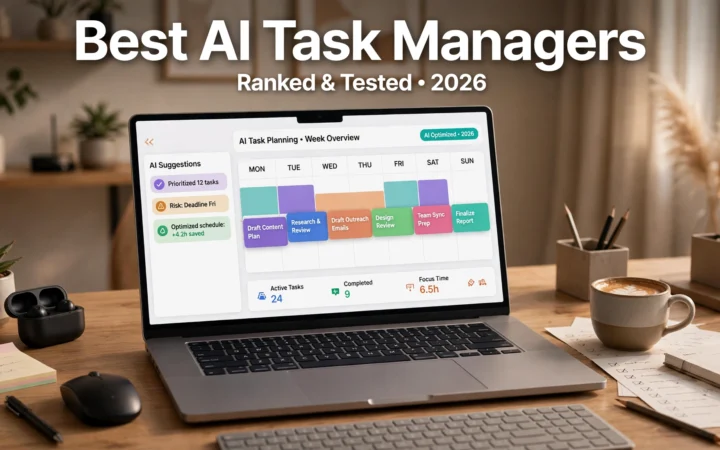
For modern corporate executives, startup founders, agency directors, and senior leaders, calendar management is an ongoing high-stakes battle. Executive schedules frequently become chaotic mosaics of back-to-back thirty-minute calls, fragmented focus sessions, double-booked stakeholder briefings, and timezone miscalculations. The cognitive friction of negotiating meeting availability via endless email chains pulls leadership away from strategic decision-making, revenue oversight, and high-leverage organizational execution. In 2026, intelligent automation has elevated executive productivity. The deployment of AI calendar assistants for busy executives has transformed passive digital planners into proactive autonomous operational partners.
Unlike legacy booking links—such as basic Calendly or Google Calendar scheduling slots that force the recipient to navigate an impersonal grid—modern artificial intelligence scheduling agents operate contextually. They parse incoming email threads, interpret urgency, understand hierarchical organizational priorities, balance internal team availability, protect cognitive deep-work hours, and dynamically reschedule conflicting obligations when urgent client crises arise. Leveraging an automated meeting scheduling system paired with predictive time-blocking enables busy leaders to reclaim between eight and twelve hours of productive capacity every single week.
In this comprehensive evaluation based on enterprise executive workflows, scheduling benchmark data, time-audit analytics, and verified professional user feedback, we review the top artificial intelligence calendar platforms available in 2026. From autonomous natural language agents to holistic multi-calendar optimization engines, we analyze which software delivers the seamless scheduling experience demanded by modern leadership.
AdSense & Editorial Compliance: This product review is compiled independently through technical feature testing, enterprise calendar API audits, and user sentiment analysis. We do not accept paid placement or affiliate sponsorship fees. Calendar software subscription models, per-seat pricing, and enterprise add-ons change periodically; prices may change — check the official site for updated billing details.
The Anatomy of Calendar Chaos: Why Static Calendars Fail Leadership
To recognize why specialized AI calendar engines are essential for executive management, one must evaluate the structural failure points of standard calendar applications like default Google Calendar or Microsoft Outlook.
1. The Fragility of Manual Time Blocking
Most executives understand the theoretical importance of blocking out two hours every morning for strategic planning or executive writing. However, on standard calendars, a "Focus Block" is treated as a static event. The moment a client requests an emergency call, or an executive assistant attempts to slot in an urgent board review, the focus block is either deleted or overridden. Within days, the executive's schedule descends back into fractured 15-minute intervals. Modern AI tools treat executive time blocking as dynamic: if a high-priority meeting overrides a focus session, the AI algorithm immediately and autonomously shifts that focus block to the next optimal opening in the week.
2. The Cognitive Tax of Multi-Party Availability Negotiations
Coordinating a 45-minute quarterly review involving an internal CFO, an external legal counsel, two agency partners, and a board director across three different time zones is an administrative nightmare. An executive assistant typically sends dozens of emails back and forth proposing dates, holding placeholder slots, and canceling tentative holds when conflicts emerge. AI scheduling agents solve this through multi-tenant availability graphs, finding the mathematically optimal consensus slot in seconds without human back-and-forth.
3. Contextual Meeting Preparation Deficits
Sitting down for eight back-to-back video meetings each day often leaves executives disoriented. Who is this client? What was agreed upon in the last meeting? What are the open action items? Modern AI calendar engines function as a smart agenda organizer, automatically pulling relevant emails, shared Google Docs, CRM notes, and previous action items directly into the calendar appointment five minutes before the call starts.
Top 6 AI Calendar Assistants Compared
Below is a comparative breakdown of the leading artificial intelligence calendar assistants designed for executive and enterprise environments.
Platform | Primary Integration | Autonomous Rescheduling | Natural Language Email Parsing | Focus Time Protection | Target User Persona | Pricing Model |
Motion (UseMotion) | Google & Outlook Calendar | Exceptional (Dynamic re-prioritization) | Integrated task & booking engine | Aggressive algorithmic blocking | Founders, project leaders, solo executives | Monthly / Annual subscription |
Reclaim.ai | Google Calendar & Slack | Very High (Flexible vs Defensible blocks) | Smart habit & task prioritization | Industry-leading habit protection | Engineering managers, product leaders, teams | Freemium / Team per-seat tiers |
Clockwise | Google & Microsoft 365 | High (Synchronized team coordination) | Clockwise AI Chatbot / Prism | Automated Focus Time consolidation | Cross-functional enterprise departments | Free basic / Enterprise per-user |
Clara Labs | Email CC Agent (Human-in-the-loop) | Full conversational delegation | Unmatched natural dialogue via email | Custom executive preferences | High-net-worth executives, VCs, CEOs | Premium enterprise monthly tier |
Vimcal | Mac, Windows, iOS (Fast keyboard UI) | Moderate (Assisted slots) | Instant slot copy, timezone mapping | Custom booking buffers | Fast-paced founders, remote operators | Monthly subscription tier |
Trevor AI | Google, Todoist, Outlook | Moderate (Task-to-calendar sync) | Predictive duration estimation | Interactive daily planning | Freelance consultants, boutique agency leads | Freemium / Affordable Pro plan |

In-Depth Reviews of the Leading Executive Calendar Engines
1. Motion: The Algorithmic Chief of Staff
Motion approaches calendar management from a complete project and task orchestration perspective. Rather than keeping a separate to-do list in Asana and an independent schedule in Google Calendar, Motion combines both into an automated algorithmic engine. An executive inputs their ongoing tasks, estimated completion durations, deadlines, and urgency levels. Motion's optimization algorithms construct the optimal daily schedule, automatically positioning tasks around fixed meetings.
If an unexpected investor call lands on your calendar at 11:00 AM, Motion dynamically shifts your afternoon tasks, calculates whether any deadlines are jeopardized, and alerts you proactively. For busy founders who struggle with task procrastination and context switching, Motion completely removes the decision fatigue of asking, "What should I work on next?"
2. Reclaim.ai: Flexible Habits and Team Work-Life Balance
Reclaim.ai has earned widespread acclaim among technology executives and engineering leaders who need to protect personal habits alongside demanding corporate schedules. Reclaim introduces a brilliant mathematical concept known as "defensible vs. flexible" time blocks. An executive can establish a habit called "Strategic Email Catch-Up" for 45 minutes every afternoon. On Monday morning, Reclaim marks that block as "Free" to outside colleagues, allowing urgent meetings to book over it. However, as the afternoon approaches and available slots disappear, Reclaim automatically flips the block to "Busy," defending the executive's boundary.
Reclaim integrates deeply with Slack, automatically updating your status to reflect whether you are in deep focus, in a client meeting, or on a lunch break, muting notifications dynamically to preserve cognitive immersion.
3. Clockwise: Optimizing Calendars Across Entire Organizations
While Motion and Reclaim focus heavily on individual productivity, Clockwise is engineered to optimize the calendar health of entire corporate departments. It addresses the systemic problem of fragmented focus time across large teams. When eight engineers and product managers each have a single isolated meeting at 10 AM, 1 PM, and 3 PM, none of them have sufficient continuous uninterrupted time to code or design.
Clockwise negotiates meeting times between internal colleagues. If two colleagues have marked a meeting as "Flexible," Clockwise's backend algorithm moves the meeting by 30 minutes to create a shared 3-hour uninterrupted "Focus Time" block for both participants simultaneously. For enterprise VPs managing 50-person teams, deploying Clockwise typically yields an average of 4 additional focus hours per employee every week.
4. Clara Labs: The Virtual Human-in-the-Loop Email Assistant
For top-tier venture capitalists, CEOs, and executive chairpersons, sending a Calendly link can occasionally appear transactional or dismissive when communicating with major institutional investors or enterprise clients. Clara provides a bespoke natural language experience. Clara sits as an assistant on your email domain (e.g., clara@yourcompany.com).
When you finish an email with a client, you simply write: "Clara, please coordinate a 45-minute zoom with David for next Tuesday afternoon." Clara immediately handles the entire back-and-forth conversation with David, checking your preferred meeting hours, favorite buffer times, and Zoom links with warm, courteous natural language. Because Clara utilizes a hybrid AI with human supervisor oversight, the scheduling accuracy approaches 100% with zero embarrassing calendar overlaps.
Google News & Industry Context: 2026 Advances in Agentic Scheduling
Industry coverage across Google News reveals that calendar scheduling is rapidly evolving into multimodal agentic operations. Major technology leaders—including Google with Gemini Workspace Extensions and Microsoft with Copilot for M365—are deploying ambient agents capable of attending meetings, analyzing spoken commitments, and dynamically inserting follow-up meetings without human prompting.
For instance, if an executive mentions during a client briefing, "Let's reconnect in three weeks to review the audit results," the ambient AI assistant detects the commitment, scans both participant calendars, generates a draft calendar invite with an agenda pre-populated with discussed deliverables, and pings the executive for one-click approval on their smartphone. As cross-platform calendar protocols become increasingly standardized, calendar assistants are transforming from reactive booking portals into predictive executive assistants.
Step-by-Step Guide: Establishing an Indestructible Executive Calendar Protocol
Implementing an AI scheduling assistant requires clear operational boundaries to ensure the software serves your strategic goals rather than accelerating meeting burnout.
- Audit Your "Energy Peaks": Identify your chronotype. If your mental clarity peaks between 8:30 AM and 11:30 AM, lock that entire window as non-negotiable deep-work focus time in your AI calendar settings. Configure your assistant to never schedule external calls during this window.
- Establish Mandatory Meeting Buffers: Back-to-back video meetings degrade cognitive processing and elevate cortisol levels. Instruct your AI tool to enforce a mandatory 10-minute buffer after internal calls and a 15-minute buffer after client calls. This guarantees time to take notes, hydrate, and prepare for the next engagement.
- Standardize Meeting Durations: Discard traditional 30-minute and 60-minute default meetings. Configure your assistant to propose 20-minute and 45-minute meetings. Shorter meetings force participants to maintain agenda discipline and automatically build recovery time into your day.
- Consolidate External Meeting Days: Train your AI assistant to cluster all external vendor and networking calls onto Tuesdays and Thursdays. Keeping Mondays, Wednesdays, and Fridays largely clear of external distractions allows for prolonged executive focus.

Frequently Asked Questions (FAQ)
Will using an AI scheduling assistant make me appear impersonal to VIP clients?
Not if deployed correctly. While sending a cold, bare booking link to a senior dignitary can feel transactional, modern AI assistants like Clara or personalized conversational templates avoid this entirely. Phrasing your invitation warmly—"I've asked my scheduling assistant, Clara, to find a time that works best for your schedule next week"—demonstrates organizational efficiency while respecting the recipient's convenience.
How do AI calendar tools handle complex multi-timezone coordination?
Multi-timezone management is where AI schedulers excel over human assistants. Software like Motion and Vimcal automatically detect the recipient's geographic IP or invite parameters, presenting meeting options translated into their exact local time. The system prevents catastrophic errors like accidentally booking a 3:00 AM call for a partner in Singapore.
Can an AI assistant access confidential information inside my calendar entries?
Enterprise calendar assistants integrate via standard OAuth 2.0 protocols and possess strict SOC 2 Type II certifications. While they require read access to your calendar metadata (start time, end time, and busy status) to detect conflicts, you can configure privacy toggles so the tool never reads private appointment titles, participant attendee names, or description bodies.
What happens if two people with competing AI assistants try to schedule a meeting?
Modern scheduling engines communicate via standardized calendar invitation protocols (iCal / CalDAV). If two users utilize AI tools, the requesting assistant sends proposed time arrays, and the receiving assistant checks its local availability graph, confirming the ideal mutual slot without human intervention.
Can these tools differentiate between internal team members and external clients?
Yes. Platforms like Reclaim and Clockwise allow executives to set distinct scheduling policies based on attendee domain. Internal colleagues may be allowed to book 15-minute syncs with 24 hours notice, whereas external sales prospects may be restricted to specific afternoon slots requiring 48 hours advance notice.
Do these AI tools integrate with video conferencing software automatically?
Every major AI calendar tool integrates natively with Zoom, Google Meet, Microsoft Teams, and Webex. The software dynamically generates unique, password-protected video conference links for every new appointment, inserting them into both the calendar location field and the confirmation email automatically.
Conclusion: Reclaiming Your Executive Cognitive Bandwidth
An executive's most scarce, non-renewable resource is not capital, personnel, or market opportunity; it is focused cognitive attention. Operating with a cluttered, reactive calendar drains mental energy and leaves leadership chronically overwhelmed. By implementing the best AI calendar assistants for busy executives, you transition from managing scheduling logistics to commanding your time. Explore the platforms that align with your operational workflow, establish rigorous time boundaries, and experience the immense clarity of an optimized executive schedule.