
“AI agent” is one of the most used — and most loosely used — terms in technology right now. This AI agents explained guide cuts through the hype: what actually distinguishes an agent from a chatbot, how the perceive-plan-act loop works, and where agents genuinely help today. By the end, you will have AI agents explained in plain language — no PhD required.
What Is an AI Agent, Exactly?
Why this matters now: agents are moving from demos to daily tools, and the buyers who understand them make better purchasing decisions. Getting AI agents explained before you shop means recognizing which “agent” products are genuinely autonomous — and which are chatbots with a price hike.
Strip away the marketing and the definition is straightforward: an AI agent is a software system that pursues a goal on your behalf by perceiving its environment, making plans, taking actions with tools, and adjusting based on what happens. The operative words are goal and actions. You do not tell an agent each step; you tell it the outcome you want, and it figures out the steps.
A concrete example makes the distinction clear. Ask a chatbot “what is the cheapest flight from Chicago to Denver next Friday” and you get text — an answer you must act on yourself. Give the same goal to a travel agent system and it searches flight options, compares prices and layovers against your stated preferences, and holds or books the itinerary, reporting back with a confirmation. The chatbot informed you; the agent did the task.
Three capabilities separate agents from simpler automation:
- Tool use. Agents call external functions — searching the web, running code, querying databases, sending messages, operating software interfaces. Without tools, a language model can only talk; with tools, it can act.
- Multi-step planning. Agents decompose a goal into sub-tasks, execute them in sequence, and replan when a step fails. A research agent that finds its first three sources are paywalled does not give up — it searches differently.
- State and memory across steps. Agents track what they have done and learned during a task, so step twelve builds on step three instead of starting over.
Note what this definition does not require: full autonomy without oversight. The most useful agents operating today are supervised — they propose, draft, and prepare, then check in before consequential actions. Autonomy is a dial, not a switch, and where you set it is the central safety decision of this entire category.
Agents vs. Chatbots vs. Assistants: The Key Differences
The one-sentence test: if it waits for your next message, it is a chatbot; if it takes the next step on its own, it is edging toward an agent. Keeping this AI agents explained distinction in mind saves you from paying agent prices for chatbot capabilities — the most common overspend in AI tooling right now.
The terminology overlap causes most of the confusion. Here is how the categories actually differ:
- Chatbot: conversational interface, single-turn or multi-turn dialogue, output is text. Answers questions; takes no external actions. Example: a basic customer-service chat widget with scripted replies.
- AI assistant: conversational interface plus limited tool access — it might search the web, set a reminder, or summarize a document. Handles one task per request; does not plan multi-step workflows independently.
- AI agent: goal-oriented system with broad tool access that plans and executes multi-step tasks, observes results, and adapts. The conversation, if there is one, is the control panel — not the product.
- Workflow automation: fixed sequence of steps triggered by events (“when a form submits, add a row and send an email”). Deterministic and brittle outside its script — the opposite of an agent’s adaptability, and often the right choice when the process never varies.
A helpful test: if the system cannot surprise you with how it completed the task — only with whether it succeeded — it is probably automation or an assistant, not an agent. Agents choose their own path; everything else follows yours.
How AI Agents Work: The Perceive–Plan–Act Loop
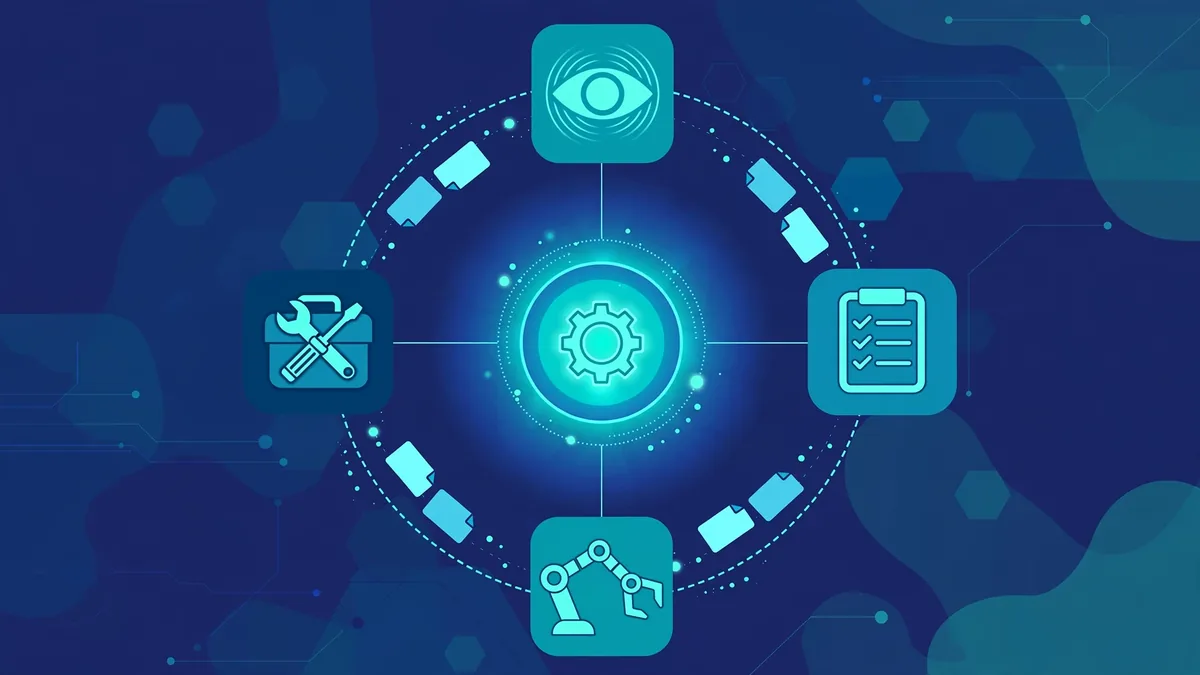
Under the hood, most agents run a loop that repeats until the goal is met or the agent gets stuck:
- Perceive. The agent gathers context: your instruction, available tools and their descriptions, the current state of the task, and any constraints you set (budget, permissions, time limits).
- Plan. The language model reasons about next steps — often visibly, in a scratchpad or “thinking” trace. It selects which tool to call and with what inputs.
- Act. The agent executes the tool call: runs a search, executes code, reads a file, clicks an interface element.
- Observe. The tool returns a result. The agent evaluates it against the goal: progress, dead end, or new information requiring a plan change.
- Repeat or report. The loop continues until the goal is complete, the agent exhausts its step budget, or it hits something requiring human judgment — at which point a well-designed agent stops and asks.
Two architectural details matter for users. First, guardrails and permissions are part of the design: which tools the agent may call, whether it needs approval before irreversible actions, and what data it may access. These are set by the product, and sometimes by you. Second, step and cost budgets bound the loop — each iteration consumes model calls, so agents typically have maximum step counts and spending limits. Understanding both is essential before you deploy an agent on anything important.
Real Examples of AI Agents in 2026
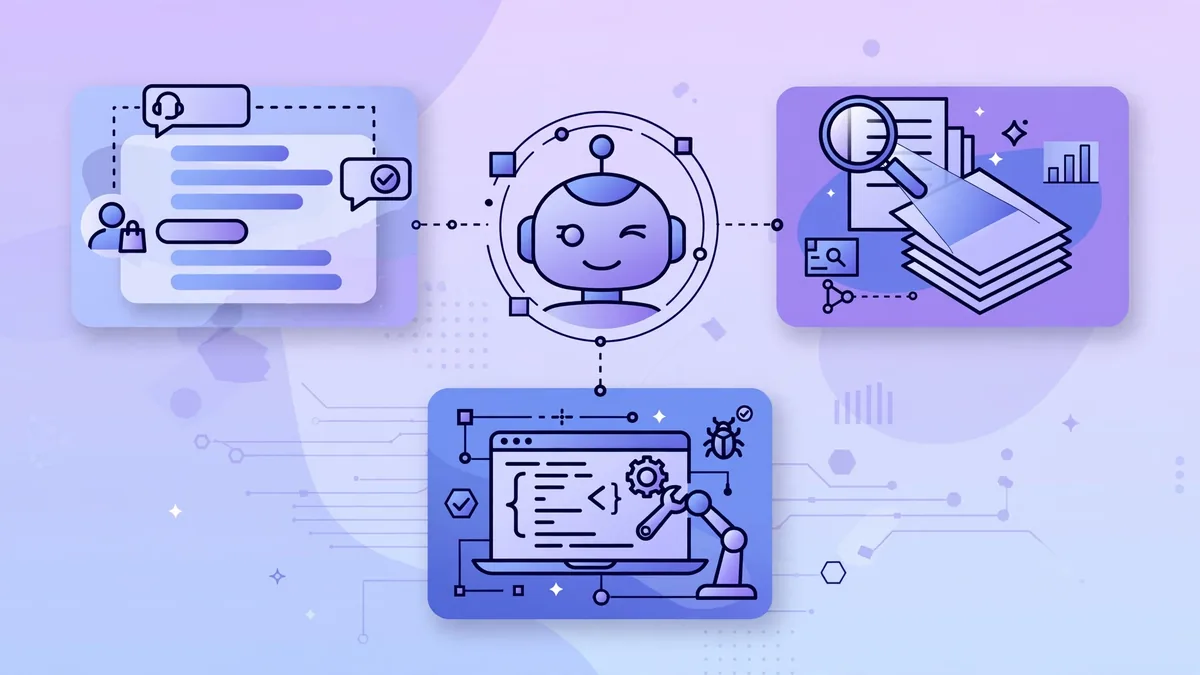
What the examples have in common: every impressive demo in this AI agents explained guide pairs autonomy with guardrails — spending limits, approval steps, and kill switches. Real-world AI agents explained honestly are never “fully autonomous”; they are supervised autonomy, and the supervision is the product.
The category is broad; these are the areas where agent systems are most established, described from their published capabilities.
Coding Agents
Coding agents are the most mature agent category. Given a task like “add user authentication to this app” or “fix the failing tests in this module,” they explore the codebase, write and edit files, run the test suite, read the errors, and iterate — the full perceive–plan–act loop against a repository. Products marketed in this space include GitHub Copilot’s agent mode, Cursor’s agent features, and Cognition’s Devin, each with published documentation describing autonomous multi-file editing with developer oversight. They shine at well-specified implementation tasks and struggle with ambiguous product decisions — which remain human work.
Research Agents
Research agents take a question like “summarize the competitive landscape for EV battery startups” and perform the work of a junior analyst: issuing dozens of searches, opening sources, extracting claims, cross-checking facts across sources, and compiling a structured report with citations. Published offerings in this space include dedicated deep-research modes from major AI labs. Their strength is breadth and stamina — they read more sources than a human would bother with. Their weakness is judgment about source quality, which is why their reports need human review before decisions rest on them.
Computer-Use Agents
Computer-use agents operate software the way a human does — moving through interfaces, clicking buttons, filling forms — rather than through APIs. Published demonstrations from major labs show agents booking travel, reconciling spreadsheets, and performing multi-app office workflows. This is the highest-potential and highest-risk category: the same generality that lets an agent use any software also makes its actions hardest to predict and audit. As of 2026, these remain early-stage products best suited to supervised, low-stakes tasks.
Customer Operations Agents
In support and operations, agents now handle entire workflows: a refund request triggers order lookup, policy check, refund issuance, and customer notification as one autonomous sequence. Helpdesk vendors publish AI-agent features built for exactly these bounded, policy-driven workflows. The pattern that works is narrow scope with explicit policy guardrails — the agent is autonomous within a well-defined playbook, and anything outside the playbook escalates to a human.
Where Agents Shine — and Where They Struggle
Agents earn their keep on tasks that are multi-step, tool-heavy, and well-specified: codebase migrations, literature-scale research, data cleanup across systems, travel planning with constraints. The common thread is that the goal is clear while the path is tedious — precisely the combination humans find draining and agents find trivial.
They struggle where goals are ambiguous, judgment is the product, or stakes are irreversible. “Improve our onboarding” is not an agent task — it is a strategy question wearing a task’s clothes. Creative direction, ethical judgment, relationship management, and novel problem-solving remain human territory, not because agents are forbidden from it but because their failure modes are silent: an agent will confidently execute a misunderstood goal, and the more autonomous it is, the further it gets before anyone notices.
The practical heuristic: give agents tasks where you can verify the outcome cheaply. Code either passes tests or does not; a research report’s claims can be spot-checked against citations; a booked itinerary can be reviewed before payment. If you cannot check the work, you should not delegate it.
Limitations and Safety: Rules Before You Hand Over the Keys
Safety rules before you start: give agents read-only access first, cap spending and API calls, and require approval for irreversible actions. This AI agents explained guide cannot stress this enough — an agent with your email credentials and no limits is an incident waiting for a typo. Start constrained, loosen gradually.
Agent safety is not theoretical — an agent with your email credentials, payment methods, and file access can cause real damage from a misunderstood instruction. These rules are non-negotiable.
Permissions and Least Privilege
Grant agents the minimum access needed for the task, exactly as you would a new employee. A research agent needs web search, not your inbox. A coding agent needs the repository, not your cloud credentials. Prefer products that support scoped permissions and approval gates for irreversible actions (purchases, deletions, external messages). If an agent requests broad access for a narrow task, that is a signal to narrow the task or choose a different tool.
Verify Before You Trust
Agents inherit the core weakness of the language models driving them: confident error. They misread tool outputs, hallucinate file contents, and chain a small early mistake into a large wrong conclusion. The defense is verification proportionate to stakes — spot-check citations in research reports, review diffs before merging agent-written code, confirm bookings before paying. Never let an agent’s output flow straight into production, publishing, or payment without a human checkpoint.
Data and Privacy Boundaries
Agents act on data they can see, which means everything you grant access to is potentially included in prompts sent to model providers. Before connecting an agent to sensitive systems, check the vendor’s published data policies: what is logged, what is used for training, and how long it is retained. For regulated or confidential data, prefer vendors with explicit enterprise data protections, and keep especially sensitive operations on supervised, narrowly scoped agents rather than general-purpose ones.
AI Agents Explained: Getting Started — A Practical Path
Do not start with autonomy; start with supervision, and earn trust in layers.
Step 1: Pick one well-specified, low-stakes task. Good candidates: “research three options for X and compare them in a table,” “draft test cases for this module,” “summarize these ten articles with key quotes.” The task should have a verifiable outcome and zero irreversible side effects.
Step 2: Use an agent feature inside a tool you already trust. Agent modes now ship inside coding editors, research platforms, and productivity suites you may already use — their published documentation describes permission models and approval gates. Starting here beats granting a standalone agent broad access on day one.
Step 3: Constrain explicitly. State the goal, the boundaries (“do not purchase anything,” “do not send emails,” “stop and ask before deleting files”), and the deliverable format. Constraints are not distrust — they are the specification the agent needs to succeed.
Step 4: Review everything, then widen gradually. Check the first several runs closely. As the agent proves reliable on a task class, reduce oversight on that class — while keeping approval gates on anything irreversible. Expand to new task classes one at a time.
Step 5: Build an agent playbook. Document which tasks are agent-approved, what permissions each gets, and where the human checkpoints sit. Teams that scale agent usage successfully treat this playbook as living infrastructure, updated every time an agent surprises them — because the surprises are where the learning lives.
Keep Exploring These Guides
If you found this ai agents explained walkthrough useful, these related guides go deeper on adjacent workflows:
- Prompt Chaining: Multi-Step AI Workflows Guide (2026)
- How to Build a No-Code AI Chatbot for Your Website
Frequently Asked Questions
What is the difference between an AI agent and a chatbot?
A chatbot produces text in a conversation; an AI agent pursues a goal by planning multi-step actions with tools — searching, coding, booking, messaging — and adapting based on results. The chatbot’s product is the answer; the agent’s product is the completed task. Many products marketed as “agents” are actually assistants with a few tools, so judge by behavior (does it plan and act independently?) rather than branding.
Are AI agents safe to use?
They are as safe as their permissions and your oversight. Agents operating with scoped access, approval gates on irreversible actions, and human review of outputs are reasonably safe for routine tasks. Risk concentrates in broad permissions, unsupervised operation, and sensitive data access. Follow least-privilege access, verify outputs before they matter, and keep humans in the loop for anything involving money, data deletion, or external communication.
Do I need coding skills to use AI agents?
No — many agent products are designed for non-technical users, with natural-language instructions and built-in guardrails. Coding skills help for evaluating coding agents’ output and for building custom agents, but using research agents, computer-use agents, and operations agents requires domain judgment about the task, not programming ability.
How much do AI agents cost?
Pricing varies widely: agent features bundled into existing subscriptions (coding editors, productivity suites), usage-based pricing per task or per action for standalone agents, and enterprise contracts for operations deployments. Because agents consume many model calls per task, usage-based costs can surprise — start with bundled features or capped pilots, monitor spend per task type, and expand once unit economics are clear.
Will AI agents replace human workers?
The honest answer is task displacement, not wholesale replacement — and it is already happening for well-specified, multi-step digital work like basic research compilation, test generation, and routine support workflows. What grows in value is everything agents do poorly: ambiguous problem-framing, judgment under uncertainty, creative direction, and accountability for outcomes. The workers most affected will be those whose jobs are mostly delegable tasks; the most resilient will be those who learn to direct agents the way managers direct teams.
Do I need to code to use AI agents?
Not anymore. This AI agents explained guide covers no-code platforms where you describe the workflow in plain language and the agent executes it. Coding helps for custom integrations, but most business uses of AI agents explained here — research, outreach, data entry — work fine without writing code.
Conclusion
AI agents are not magic and not marketing fluff — they are goal-directed systems that perceive, plan, act with tools, and adapt, and they are genuinely useful for multi-step, well-specified work from coding to research to operations. Their limits are real: confident errors, ambiguous goals, and the risks of broad permissions. Start supervised and low-stakes, constrain explicitly, verify before trusting, and widen autonomy only where verification is cheap. Used that way, agents become what the best tools always are: leverage for human judgment, not a replacement for it. Bookmark this AI agents explained guide and revisit it before buying any “agentic” tool.





Join the discussion
Have a question or a perspective to share?