
Best AI Tools for Photographers: 9 Picks for Culling and Editing (2026)
Introduction: The New Era of AI-Driven Photography
In 2026, the threshold between a tedious, hours-long post-production session and a streamlined, creative workflow has been bridged by artificial intelligence. As professional shooters demand faster turnaround times, the best AI tools for photographers have transitioned from experimental novelties to essential components of any high-end production suite. Whether you are managing high-volume wedding galleries or high-stakes commercial editorials, these intelligent assistants allow you to focus on the composition rather than the pixel-level minutiae.
Integrating these technologies isn’t just about speed; it’s about reclaiming your creative energy. By delegating repetitive tasks to sophisticated algorithms, you can scale your business while maintaining a consistent aesthetic. In this guide, we explore the best AI tools for photographers that are currently redefining industry standards. From automated culling to intelligent skin retouching, these platforms ensure that your final output remains sharp, vibrant, and perfectly polished.
Why AI Matters for Professional Photographers in 2026
The professional photography landscape in 2026 is hyper-competitive. Clients no longer wait weeks for proofs; they expect previews within hours. AI has become the great equalizer, allowing freelance photographers to handle the output volume of an entire agency. By automating the technical “heavy lifting,” such as color grading, noise reduction, and culling, professionals can drastically reduce their overhead costs and billable hours spent behind a screen.
Furthermore, AI-driven tools have matured to the point where they no longer produce the “plastic” or over-processed look common in the early 2020s. Modern machine learning models now analyze the specific context of an image—the lighting conditions, the subject’s skin texture, and the color science of your camera sensor—to apply adjustments that feel organic. In short, the best AI tools for photographers serve as a force multiplier, allowing you to produce higher-quality assets more frequently, ultimately driving a higher return on your investment in hardware and talent.
The Best AI Tools for Photographers: Our Top 6 Picks
To build the ultimate post-processing workstation, you need software that complements your specific workflow. If you are editing on the go, check out our Top Rated Android Tablets for Mobile Photo Editing, as these AI tools are becoming increasingly mobile-optimized.
1. Adobe Lightroom (AI Masking & Denoise)
Adobe Lightroom remains the industry standard, but its 2026 iteration is vastly different from its predecessors. The “AI Masking” suite can now instantly identify complex subjects, such as stray hair or intricate lace, with a single click. Similarly, the “Denoise AI” feature is a game-changer for photographers shooting at high ISOs in dark reception halls or urban settings, allowing for clean, crisp images that were previously considered unusable.
- Standout Feature: Adaptive masking that tracks movement across a subject, saving hours of manual brush work.
- Limitation: The AI features are hardware-intensive; for optimal performance, ensure your workstation is up to par with our guide on How to Build a Professional Photographer’s PC.
- Best For: Professionals who require deep, surgical control over every pixel in their RAW files.
2. AfterShoot (AI Culling)
Culling is the most dreaded task for any event or portrait photographer. AfterShoot tackles this by using advanced pattern recognition to analyze your library and automatically “flag” the best shots while discarding blinks, motion blur, and out-of-focus frames. It essentially acts as a highly trained studio assistant that never gets tired.
- Standout Feature: “AI Assist” speed, which can process thousands of RAW files in mere minutes without requiring an internet connection.
- Limitation: It is a subscription-based model that can feel restrictive for hobbyists who only shoot once or twice a year.
- Best For: Wedding and event photographers who deal with high-volume shooting and tight delivery deadlines.
3. Topaz Photo AI (Upscaling & Sharpening)
When you are handed a file that is slightly soft or you need to print a crop at a much larger size than the sensor allows, Topaz Photo AI is the definitive solution. It doesn’t just sharpen the image; it intelligently reconstructs lost detail by predicting what the original texture should look like. It is arguably one of the best AI tools for photographers looking to salvage “problem shots.”
- Standout Feature: The “Face Recovery” tool, which can magically restore sharpness to eyes and facial features in portraits that were slightly missed by autofocus.
- Limitation: Can occasionally “over-bake” images if the sharpening intensity is set too high, leading to artifacts that look digital upon close inspection.
- Best For: Wildlife, sports, and commercial photographers who frequently need to crop deeply or recover low-resolution archival files.
As you integrate these tools, remember that your storage strategy is equally important. Ensure you are backing up your massive RAW files effectively by reviewing our Best Cloud Storage Services for RAW Files to keep your project data safe and accessible as you utilize the best AI tools for photographers.
Why AI Matters for Professional Photographers in 2026
In 2026, the professional photography landscape has shifted from manual pixel-pushing to a workflow defined by curation and creative direction. The explosion of high-resolution sensors and the sheer volume of RAW data generated per shoot have made traditional editing techniques a bottleneck for growth. For the modern professional, AI is no longer a gimmick; it is an essential layer of the production stack that bridges the gap between raw captures and client-ready deliverables.
By automating the “heavy lifting”—such as culling thousands of shots or applying base-level skin corrections—AI allows photographers to reclaim hours of their day. This time reclamation isn’t just about efficiency; it’s about mental bandwidth. When you aren’t spending four hours dragging sliders for exposure and noise reduction, you have more energy to invest in lighting design, client communication, and overall artistic composition. The best AI tools for photographers essentially act as a highly skilled digital assistant that never tires, ensuring consistent quality even during peak wedding or event seasons.
Furthermore, these tools are evolving to become context-aware. Modern algorithms don’t just apply global adjustments; they understand the semantic content of an image. Whether identifying a subject’s eyes in a portrait or recognizing the sky for masking in a landscape, AI is providing surgical precision that was previously impossible to achieve without significant manual intervention. Integrating these solutions into your workflow—whether you are working on a high-end desktop or editing on the go with top-tier mobile hardware—is the single most effective way to scale your photography business in the current market.
The Best AI Tools for Photographers: Our Top 6 Picks
4. Evoto AI (Portrait Retouching)
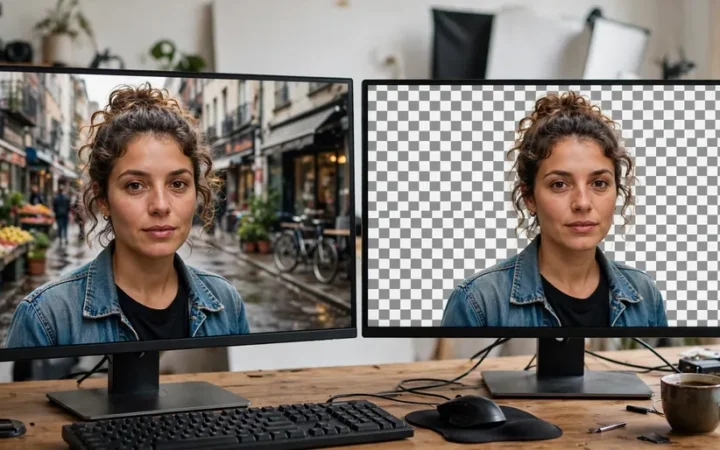
Evoto has quickly become the gold standard for high-volume portrait and wedding photographers. Unlike legacy retouching software, Evoto utilizes a “non-destructive” AI engine that identifies facial features with incredible accuracy. It handles skin smoothing, blemish removal, and digital makeup while strictly preserving natural skin textures—a common pain point for professionals who fear the “plastic” look. Its batch processing capabilities allow for the application of complex retouching presets across hundreds of photos simultaneously, making it an indispensable asset for those managing large portrait galleries.
5. Radiant Photo (Intelligent Color Science)
Radiant Photo distinguishes itself by focusing on the underlying color science of an image. It analyzes the dynamic range of every pixel to intelligently expand shadows and recover highlights without clipping. Rather than relying on simple presets, it applies a “smart” adjustment that treats each image as a unique set of challenges. It is particularly effective for photographers who want a polished, professional look without the manual grind of color grading. For those looking to streamline their infrastructure alongside their software, investing in the right hardware is just as important as choosing the best AI tools small business needs in 2026.
6. Imagen AI (Personalized Style Matching)
Imagen AI represents the pinnacle of machine learning integration in the editing suite. By analyzing your past edits, Imagen builds a “Personal AI Profile” that learns your unique aesthetic—from your specific contrast curves to your preferred white balance. Once trained, it applies those stylistic choices to new shoots with near-human consistency. This tool is transformative for photographers struggling with burnout, as it effectively offloads the entire post-production editing phase to a system that mimics your personal artistic signature.
How We Selected the Best AI Tools for Photographers
Selecting the best AI tools for photographers requires a balance of speed, output quality, and ecosystem compatibility. We evaluated these tools based on their ability to handle RAW files, their integration with Adobe Creative Cloud, and their processing time per image.
| Tool | Best for | Starting price |
|---|---|---|
| Adobe Lightroom | Selective Masking & Denoise | $9.99/mo |
| AfterShoot | High-Volume RAW Culling | $15/mo |
| Topaz Photo AI | Restoration & Upscaling | $199 (Perpetual) |
| Evoto AI | Portrait Retouching | Pay-per-export |
| Radiant Photo | Color Science & Dynamic Range | $139 (Perpetual) |
| Imagen AI | Personalized Style Matching | Variable (usage-based) |
As you integrate these into your process, remember that the goal is not to remove your artistic voice, but to amplify it. The best AI tools for photographers serve as a foundation, allowing you to bypass the technical drudgery and focus on the moments that define your brand.
How to Choose the Right AI Tool for Your Photographer’s Workflow
Selecting the best AI tools for photographers requires a strategic approach rather than a “one-size-fits-all” mentality. To determine which software deserves a spot in your toolkit, follow this checklist:
- Assess Your Bottlenecks: Identify where you lose the most time. If you spend hours deleting duds, prioritize culling software like AfterShoot. If skin retouching is your primary pain point, focus on portrait-specialized tools like Evoto.
- Evaluate Hardware Compatibility: AI processes are resource-intensive. Ensure your current machine can handle the GPU overhead. If your workstation needs an upgrade, check our guide on how to build a professional photographer’s PC to ensure your system doesn’t throttle these advanced algorithms.
- Check Integration Capabilities: The best software functions as an extension of your existing workflow, not a disruption. Look for plugins that integrate directly into Adobe Lightroom or Photoshop to avoid tedious file exporting and importing.
- Analyze Data Management: Professional photography involves massive file sizes. As your library grows, you will need a robust strategy for organizing RAW files to ensure your AI tools can access and process your images efficiently.
- Calculate the ROI: Don’t just look at the monthly cost. Calculate the “time saved” vs. “hourly rate.” If an AI tool saves you five hours of editing per week at your professional rate, the subscription price is almost always justified.
The Honest Downsides
While the best AI tools for photographers are revolutionary, they are not without friction. First, the “subscription fatigue” is real; many services have moved to credit-based models where you pay per edited image, which can become prohibitively expensive for high-volume wedding or event shooters.
Second, data privacy remains a critical concern. Many cloud-based AI tools require you to upload your RAW files to their servers. Always read the privacy policy to ensure you maintain full copyright ownership and that your clients’ personal data is not being used to train the company’s public models. Finally, there is a learning curve. Achieving a “natural” look often requires adjusting the default AI intensity; over-reliance on these tools can lead to a “plastic” aesthetic that lacks the depth of human-guided retouching.
Tips to Get the Best Results
- Shoot for the AI: AI works best with clean, well-exposed source material. Good lighting and proper exposure settings—which you can refine using guidance from Adobe’s official support documentation—help AI algorithms perform with higher accuracy.
- Establish a Baseline: Before applying AI presets or batch edits, ensure your white balance and exposure are consistent across the folder.
- Keep Human Oversight: Never automate the final export. Always review AI-retouched portraits at 100% zoom to check for edge artifacts or unnatural texture smoothing.
- Stay Updated: AI technology evolves rapidly. Keep your software updated to access the latest neural networks, similar to how OpenAI updates their models to handle increasingly complex data processing tasks.
FAQ
Does using AI tools diminish my artistic value?
Not at all. The best AI tools for photographers act as a digital assistant, handling the tedious technical labor so you can focus on composition, lighting, and storytelling. It shifts your role from a pixel-pusher to a creative director.
Can AI-edited photos still be used for high-end professional prints?
Yes, provided you use reputable software. Tools like Topaz Photo AI are specifically designed to preserve detail and texture, making them suitable for large-format printing if the original file is high-quality.
Will these tools eventually replace the need for manual editing?
While automation will handle 90% of the heavy lifting, the human eye is still required for final quality control and stylistic nuance. The most successful photographers use AI to reach 90% completion and then add their final, artistic “human touch.”
Are there free versions of these AI tools?
Most industry-standard software operates on subscription or pay-per-use models because the server-side computing required for these tools is expensive. Be wary of “free” AI generators, as they often sacrifice privacy or image quality.
How do I ensure my images remain secure?
Always check if the tool uses local processing or cloud processing. If you are handling sensitive images, look for software that offers a local-only processing mode as one of the best AI tools for photographers.
Conclusion: Investing in Your Creative Future
The transition toward AI-augmented photography is not a replacement for talent, but an elevation of it. By leveraging these technologies, you regain the most valuable asset in the creative industry: time. Whether you are using AI to salvage a noisy low-light shot or to cull thousands of frames from a fast-paced shoot, these tools allow you to scale your business without sacrificing the quality that keeps your clients coming back.
As we look toward the remainder of 2026, the gap between those who adopt these tools and those who resist them will likely widen. Embracing these advancements doesn’t mean losing your personal style; it means optimizing your workflow to focus on what you do best: capturing moments. Invest in the right software, master your chosen tools, and let technology handle the repetition while you chase the next great shot.

Join the discussion
Have a question or a perspective to share?