In digital design, e-commerce merchandising, photography, and film production, resolution is a non-negotiable metric of quality. Whether preparing vintage family photographs for physical canvas printing, enlarging compressed web assets for billboard advertisements, or enhancing synthetic Midjourney renders to 8K resolution, creative professionals frequently encounter the frustrating barrier of pixelation. For decades, traditional digital enlargement relied on mathematical interpolation algorithms like bicubic or Lanczos resampling. While these legacy tools smoothed jagged edges, they were incapable of creating new information, resulting in blurry, soft, and muddy enlargements.
In 2026, the resolution paradigm has been completely redefined by modern deep learning architectures. Modern AI image upscalers do not simply stretch pixels; they hallucinate and reconstruct missing microscopic details based on neural networks trained on millions of high-definition photographs. By deploying advanced diffusion and generative adversarial network (GAN) models, a modern 4K photo enhancer AI can analyze an out-of-focus snapshot, sharpen individual eyelashes, synthesize realistic skin pores, eliminate JPEG compression noise, and restore faded historical prints.
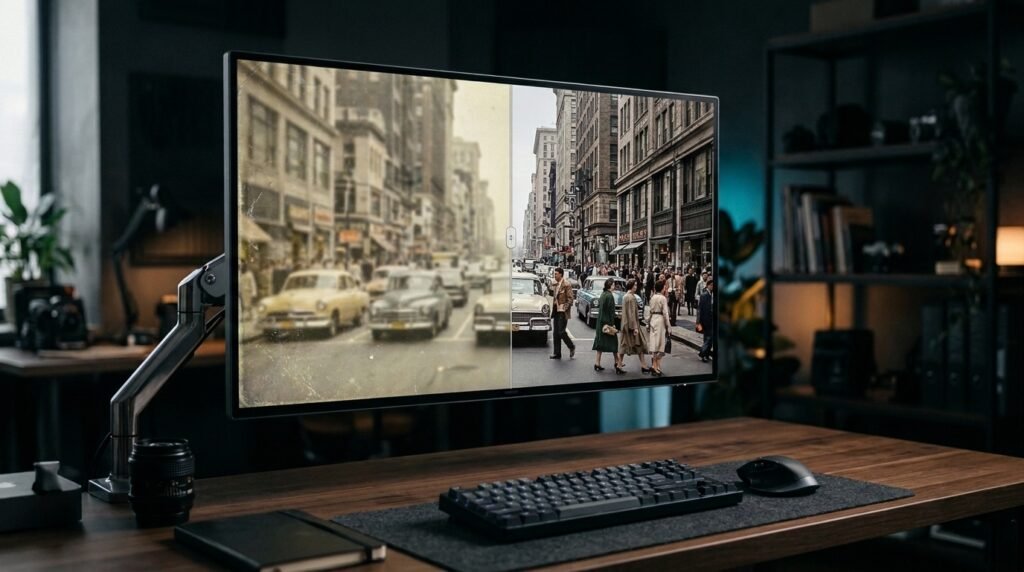
Whether you require generative image upscaling to add photorealistic micro-textures to 3D artwork or need to restore old photos AI utilities can bring back to life with authentic colorization, choosing the right tool makes the difference between a pristine commercial asset and an uncanny plastic disaster. Based on image restoration fidelity, text preservation, processing speed, and local versus cloud deployment flexibility, this comprehensive editorial review evaluates the premier AI image upscalers available in 2026.
Editorial Note: DroidOrbit provides strictly objective software evaluations based on public API benchmarks, professional creative community feedback, and published developer whitepapers. We do not accept sponsored affiliate placements. Software subscription pricing referenced in this review reflects public vendor rates at the time of publication; prices may change — check the official site for current tier structures.
The Evolution from Interpolation to Generative Reconstruction
To evaluate upscaling tools effectively, creative directors and photographers must understand the three distinct technological generations of digital enlargement:
1. Classical Mathematical Interpolation (Bicubic and Lanczos)
Traditional tools estimate the color value of new pixels by averaging surrounding existing pixels. This prevents severe stair-stepping pixelation but fundamentally blurs fine details, creating a watercolor-like softening across sharp edges.
2. Super-Resolution Convolutional Neural Networks (ESRGAN and Real-ESRGAN)
The first major leap in AI upscaling arrived with Enhanced Super-Resolution Generative Adversarial Networks (ESRGAN). These models were trained on paired low-resolution and high-resolution datasets, learning to predict realistic edge gradients, sharp lines, and geometric patterns. While exceptionally fast and lightweight, early ESRGAN models occasionally produced synthetic, repetitive artifacts across organic textures like grass, wood grain, and human skin.
3. Modern Latent Diffusion Upscalers and Generative Refiners
The state-of-the-art in 2026 is generative diffusion upscaling (such as Magnific AI and Topaz Gigapixel AI Generative models). Rather than merely sharpening existing pixels, these models take a low-resolution input, inject subtle Gaussian noise, and re-synthesize high-frequency details guided by text prompts and hallucination sliders. You can command the AI to reconstruct pores, fabric weaves, rust textures, and atmospheric dust, transforming a 512×512 thumbnail into a breathtaking 8K masterpiece.
Top 5 AI Image Upscalers and Enhancers in 2026
We evaluated the leading automated upscaling and image enhancement platforms across photographic realism, artifact suppression, face restoration, and workflow ergonomics:
1. Topaz Gigapixel AI — The Undisputed Professional Studio Benchmark
Topaz Labs has long been the gold standard for commercial photographers, visual effects houses, and forensic print labs, celebrated for its dedicated desktop hardware acceleration.
- Core Capabilities: Offers specialized neural network models tailored for specific image types: Standard, High Fidelity, Low Resolution, Text & Shapes, and CGI/Art. Enlarges images up to 600% with absolute zero cloud upload requirements, running locally on your workstation's Nvidia or Apple Silicon GPU.
- Face Recovery Engine: Automatically detects human faces in low-resolution crowd shots, applying targeted generative reconstruction to restore realistic eyes, teeth, and skin texture without distorting the subject's distinct facial identity.
- Print Preparedness: Native integration with Adobe Photoshop and Lightroom, featuring built-in DPI resolution calculators and color profile preservation.
2. Magnific AI — The Pinnacle of Generative Re-Imagination
Magnific AI took the creative world by storm by introducing controllable generative hallucination, making it an indispensable weapon for concept artists, digital matte painters, and art directors.
- Core Capabilities: Allows users to dial in exact "Creativity" and "Hallucination" sliders. Kept low, it acts as a pristine, razor-sharp upscaler; turned up, it injects jaw-dropping cinematic details—adding realistic dew drops to flowers, intricate stitching to leather jackets, or cinematic micro-scratches to metal armor.
- Prompt-Guided Enhancement: Users can guide the upscaling process using natural language prompts, steering the model to interpret ambiguous blurry shapes into specific real-world textures.
- Resolution Limits: Effortlessly exports ultra-high-definition 4K, 8K, and 10K image canvases suitable for massive theatrical projection and commercial packaging.
3. Upscayl — The Free, Open-Source Local Champion
For independent creators and privacy-conscious users who reject monthly cloud subscriptions, Upscayl is an extraordinary open-source gift to the creative community.
- Core Capabilities: Completely free, open-source under the AGPL license, and runs 100% locally on your Linux, macOS, or Windows computer using Vulkan GPU acceleration.
- Multiple AI Models: Ships with pre-configured models including Real-ESRGAN, Remacri, Ultramix, and specialized Digital Art anime models.
- Batch Processing: Queue thousands of low-resolution images in a folder and upscale them overnight with zero network connectivity or data usage.
4. VanceAI — Comprehensive Cloud Enhancement Suite
VanceAI is engineered for e-commerce store owners, real estate agents, and marketing teams who require an all-in-one cloud-based restoration studio.
- Core Capabilities: Features one-click specialized modules for background removal, old photo scratch repair, black-and-white colorization, and product photo sharpening.
- API Integration: Offers robust REST APIs that allow online retailers to automate image enlargement and cleanup across massive product catalogs.
5. Krea AI — Real-Time Generative Upscaling and Scene Enhancement
Krea AI merges real-time generative canvas tools with an extraordinarily fast diffusion upscaler designed for digital illustrators and concept artists.
- Core Capabilities: Real-time interactive generation that upscales visual drafts while allowing users to paint live adjustments. Its enhancer module excels at turning flat synthetic renders into organic, atmospheric photography.
- High-Speed Cloud Inference: Produces clean 4K upscales in seconds, making it ideal for high-velocity mood-boarding and social media production.

AI Image Upscaler Comparison Matrix
Platform | Deployment Type | Max Enlargement | Generative Hallucination | Face Restoration Quality | Target Audience |
Topaz Gigapixel AI | Local Desktop App | 600% (Up to 32,000px) | Subtle / High Fidelity | Class-Leading (Natural) | Professional Photographers & Print Studios |
Magnific AI | Cloud Web SaaS | Up to 16x (10K+) | Controllable Hallucination | Exceptional (Cinematic) | Concept Artists, VFX & Art Directors |
Upscayl | Local Desktop (Open Source) | Up to 8x (Real-ESRGAN) | Deterministic / Non-Generative | Good (via Models) | Indie Creators, Developers & Budget Users |
VanceAI | Cloud Web & API | Up to 8x | Moderate | Specialized Old Photo Repair | E-Commerce Merchandisers & Realtors |
Krea AI | Cloud Web App | Up to 4K / 8K | Interactive Diffusion | Creative / Stylized | Illustrators, 3D Artists & Agencies |
Best Practices for Restoring Vintage and Degraded Photographs
Restoring damaged historical prints requires a disciplined multi-stage workflow to avoid uncanny synthetic distortions:
1. High-Resolution Optical Flatbed Scanning
Never attempt to restore a vintage physical photograph by taking a picture of it with a smartphone camera. Room lighting introduces glare, lens curvature distorts geometry, and smartphone noise-reduction smears fragile details. Always scan the original print on a dedicated flatbed scanner at 600 to 1200 DPI in uncompressed 24-bit TIFF format.
2. Separate Geometric Inpainting from Textural Upscaling
Before running an AI upscaler, manually clean major physical defects in Photoshop or GIMP: clone out large tears, white chemical spots, and deep fold creases. If you feed an uncleaned photo into a generative upscaler, the AI may mistake a crease across a subject's face for a severe scar or facial wrinkle.
3. Calibrate Hallucination Sliders to Preserve True Likeness
When restoring historical portraits of deceased family members, keep generative creativity sliders below 20%. While high hallucination makes the photo look remarkably sharp, it often alters the subject's eye shape, smile, or nose structure, erasing their true biological likeness. Prioritize high-fidelity models like Topaz Gigapixel's Face Recovery or GFPGAN that lock original bone structure.

Phase 4 — Commercial Print Production and CMYK Color Space Workflows
Upscaling digital imagery for on-screen viewing is only half the battle; preparing enlarged assets for physical fine-art printing or massive commercial packaging introduces demanding colorimetric challenges.
1. Color Space Management and Gamut Clipping
Most AI upscalers operate natively in standard digital sRGB or wide-gamut Adobe RGB color profiles. However, commercial offset printing presses operate in subtractive CMYK color spaces. When an AI upscaler synthesizes ultra-vivid highlights or neon gradients, converting the file to CMYK can cause severe 'gamut clipping', dulling vibrant hues. Creative professionals must inspect soft-proofing profiles in Adobe Photoshop after upscaling, adjusting saturation curves to ensure printed banners faithfully reproduce digital colors.
2. Calculating Viewing Distance and Target DPI/PPI
A common misconception is that all printed materials require 300 Dots Per Inch (DPI). While handheld fine-art prints and photo books demand 300 to 600 DPI, large-format trade show displays and highway billboards are viewed from several yards away. For billboard production, 50 to 100 DPI is standard. Understanding viewing distance calculations prevents designers from unnecessarily over-rendering multi-gigabyte files that choke RIP (Raster Image Processor) hardware.
3. Tile-Based Slicing for Gigapixel Murals
When producing multi-meter architectural murals or massive museum exhibitions, the target resolution can easily exceed 50,000 pixels across. Running a single 50,000-pixel render will crash GPU memory buffers. Professional studios utilize automated Python or Photoshop scripts to slice images into overlapping 4,000-pixel tiles, process each tile through Topaz Gigapixel or Upscayl, and re-stitch the seam-blended tiles into a seamless gigapixel master canvas.

Frequently Asked Questions (FAQ)
Can AI image upscalers truly add detail that was not in the original photo?
Yes. This is the fundamental distinction between classical interpolation and modern generative AI. Generative upscalers utilize neural networks trained on vast visual corpuses to predict and synthesize authentic microscopic details (such as iris patterns, individual hair strands, and fabric weaves) that match the statistical probability of what should exist in high resolution.
Is local upscaling better than cloud-based upscaling?
Local upscalers (like Topaz Gigapixel and Upscayl) offer complete data privacy, zero recurring subscription fees, and no file size upload limits, but require powerful computer hardware (such as an Nvidia RTX GPU with 8GB+ of VRAM or an Apple Silicon Mac). Cloud upscalers (like Magnific AI) process heavy diffusion models on enterprise cloud servers, making them accessible from any lightweight laptop, but require monthly credits.
How much does professional AI upscaling software cost?
Open-source tools like Upscayl are 100% free. Topaz Gigapixel AI is sold as a perpetual desktop license with one year of updates for $99. Cloud platforms like Magnific AI and Krea operate on subscription tiers ranging from $30 to $99 per month depending on generation volume. Pricing may change — check the official site for current tier structures.
Can AI upscalers read and sharpen blurry text on documents?
Upscaling small blurry text is one of the most challenging tasks for generative models. Standard upscalers often turn illegible text into strange alien runes or pseudowords. However, Topaz Gigapixel includes a specialized 'Text & Shapes' model that preserves crisp typography and vector-like edges without hallucinating fictional characters.
What is the best format to save upscaled images in?
Always export your upscaled assets in uncompressed 16-bit PNG or TIFF format to preserve dynamic range and prevent secondary compression artifacts. Only convert to WebP or JPEG when preparing final optimized assets for web publication.
Can AI upscalers enlarge video frames as well?
While static upscalers can process video frame-by-frame, doing so often results in temporal flicker between frames. For video enlargement, dedicated temporal models (such as Topaz Video AI) should be utilized to maintain optical motion coherence across adjacent frames.
Conclusion: The End of Low-Resolution Limitations
The days of abandoning low-resolution visual assets or settling for blurry pixelated prints are officially over. Modern AI image upscalers have turned digital enlargement into an exact, controllable art form.
Whether you deploy Topaz Gigapixel AI for precision commercial photography, leverage Magnific AI for breathtaking cinematic world-building, or utilize the free open-source power of Upscayl, adopting AI super-resolution technology permanently unlocks the full visual potential of your creative archives in 2026.